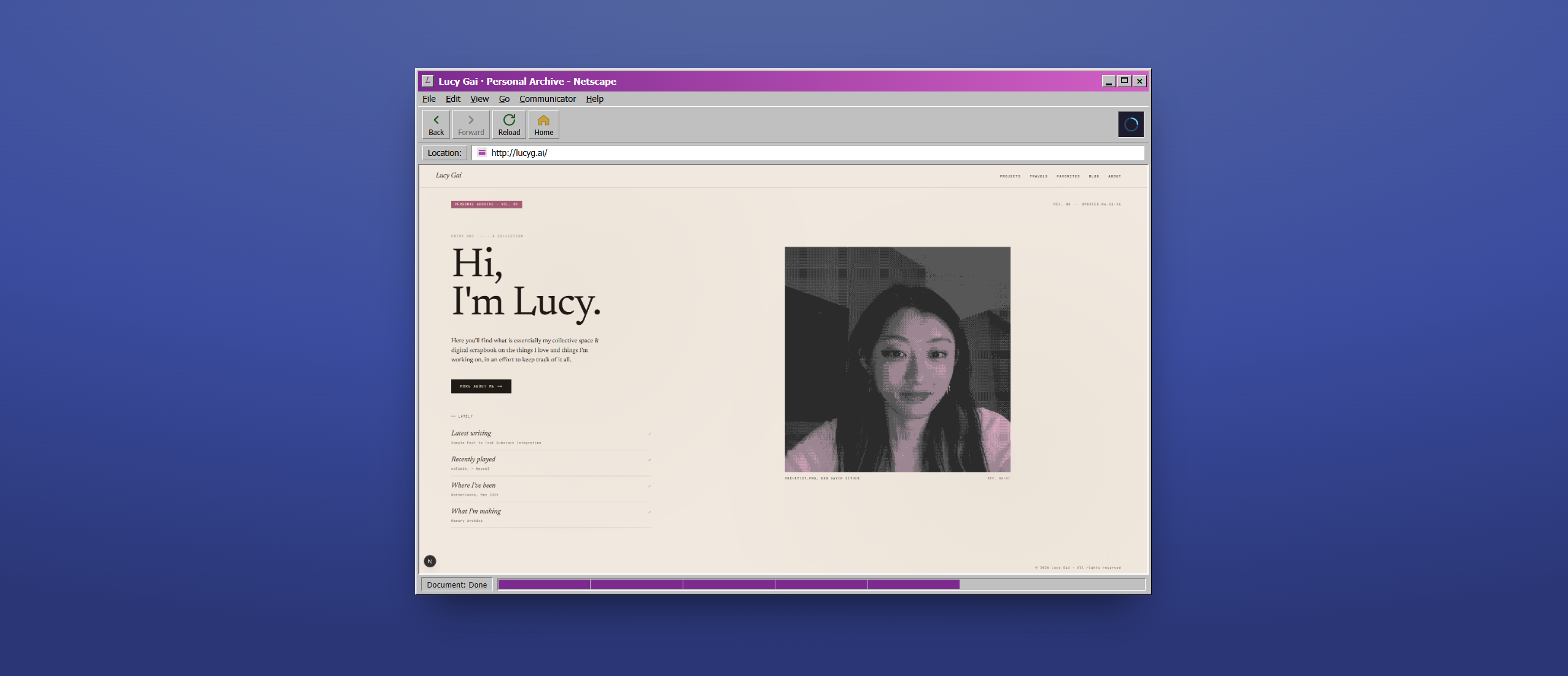
Memory Archive.
A personal blog/journal/showcase in an attempt to organize and document some aspects of (my) life. Created by a backend engineer who has barely any frontend experience but decided to go for it with Claude and other AI tooling (but mostly Claude).
Motivation
Between years of Google docs, tumblr's long forgotten, notes app entries, Obsidian journals, and several other blogging and notekeeping methods, I decided that it was only time...
...to make another one (be it a blog, a journal, or whatever you call it).
I have a habit of feeling like I have too many thoughts, and then proceeding to lose them in the next month. So in another attempt to try to organize the things I am currently enjoying or have done in the past, I've decided to build this site as a sort of central hub to bring together the various interests or aspects of my life, and hopefully use it as something to look back on (especially on days when I wonder what I've been doing with my life.)
Design Process
I initially created one design in Canva, with several mock-ups of the various pages I knew I wanted.
The general aesthetic idea was a mix of Y2K and scrapbook-esque pages. I quickly realized that scrapbooking clashes with the general nature of modern web layouts and decided (sadly) that I'd need something more grid-based since it'd be easier for a beginner like me to maintain.
With the release of Claude Design, I decided to create a prototype of version 2 with some of the scrapbook feel but ultimately something more refined.
My initial prompt mentioned "minimal", "clean", yet still "scrapbook" and "artsy", and to take inspiration from the "memory archive, Japanese stationary, or zine aesthetic". Claude Design took that quite literally and gave me three directions to choose from:
"Memory Archive" was chosen off the bat -- it was the cleanest prototype and I felt there was more potential to build off it.
85% of the work and prompting came down to refining smaller details, as expected. From the metadata strip to the music display to the contact card layout, etc etc, I went through several variations and resizes of various components on each page.
Final summary of design choices are shown in /docs/design.md.
Some Brief Technical Details
| Area | Choice |
|---|---|
| Framework | Next.js 15.5.7 (App Router) |
| UI runtime | React 19.2.3 |
| Language | TypeScript 5, strict: true, target ES2017, @/* → src/* path alias |
| Styling | MUI Material 7 (sx props) for public UI; Tailwind CSS 4 (dev dependency) for the admin editor; Emotion as MUI's styling engine |
| Content parsing | fast-xml-parser (Substack RSS) + sanitize-html (untrusted feed HTML) |
| Tooling | ESLint 9 (next/core-web-vitals + next/typescript), Node .mjs scripts |
| Data | No database. Content lives in version control as typed data files, fine for a single-author site |
| Images | Most images in external Supabase storage buckets, no CMS |
Notable Features
Travel Page Layout
Travel pages are probably the most personal part of the site — I wanted the scrapbook feel back, but in a way that wouldn't fall apart on every screen size. Instead of fighting responsive CSS to get overlapping photos, rotated tape, and text sitting exactly where I want it, each trip is laid out on a fixed canvas (like a poster) at three set widths, and the whole thing scales down as one unit to fit whatever screen it's on. I hand-author the large layout, and a script derives the medium and small versions automatically — medium is basically a proportional shrink, small collapses everything into a single stacked column.
Travel Page Editor
Since I'm placing dozens of photos and text blocks by hand per trip, I ended up building myself a little drag-and-drop editor (dev-only, under a protected admin route) to visually position and resize everything on the fixed canvas instead of hand-editing raw coordinates in JSON. It renders the same components the public page uses, just at true scale instead of shrunk down, so dragging something with the mouse maps directly onto real design coordinates without extra math.
Metadata Strip
Every page has a small metadata strip up top with a section tab and an "updated" date, styled like a library catalog card. Rather than manually bumping those dates every time I touch a page, a script runs before dev and build and regenerates them automatically, so the catalog always looks current without me remembering to do it by hand.
Substack Integration
My blog posts actually live on Substack, not in this repo — the site fetches my Substack RSS feed, parses it, and sanitizes the HTML before rendering it (never trust a third party's raw markup), then caches the result for an hour so I'm not re-fetching on every single visit.
Claude Skills
Since a lot of the content work here is repetitive (adding a new trip, managing favorite albums, deriving responsive layouts), I built myself a handful of custom Claude Code "skills" — scripted, repeatable workflows for the tedious multi-file parts, like keeping a trip's slug identical across its JSON, route, and index entry. Anytime I need to do a common task, Claude already knows what to do, and there's less chance of forgetting to update one of the files.
Current Skills
- add-trip
- derive-travel-layouts
- design-check
- manage-albums
What's Next
For now, all I hope is that I'll continue to upkeep this space and use it as the sort of journal and inspiration it was intended to be.
In the future, I do plan on refining the design, maybe once I do some more learning on design principles and UX. Right now I feel like Memory Archive sits at a pretty average (but nice!) space in terms of remaining relatively clean, but not quite bringing much unique flavor to the table. (This is obviously a limitation to springboarding with Claude.) I am also cautious of going overboard with things like animations and getting lost in the sauce.
And also sometime (hopefully by the time you read this) there will be a dark mode...